Updated: 25 Apr 2026
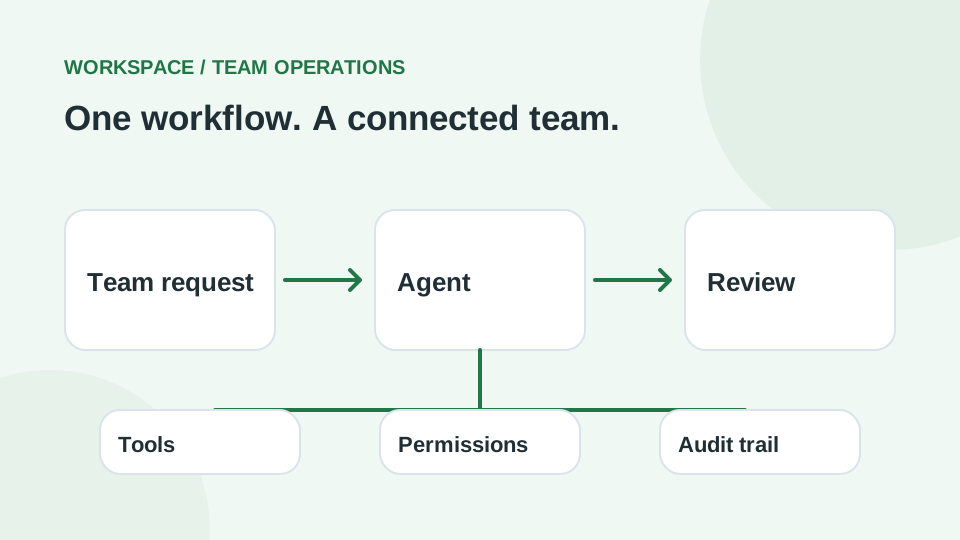
Workspace AI agents are turning “AI adoption” from personal productivity into team-level operations. Instead of everyone writing their own prompts, a team can build a reusable workflow once, then run it repeatedly with permissions, approvals, and audit logs.
What is a workspace agent (simple definition)
A workspace agent is an AI workflow that can:
- follow multi-step processes,
- use connected tools (within organization controls),
- run on a schedule or inside team chat,
- request approvals for sensitive actions.
Why teams are searching for this in 2026
- More autonomy: agents plan and execute, not only answer.
- More governance: admins need visibility and control.
- More repeatability: workflows beat one-off prompting.
Practical use cases (realistic examples)
- Weekly Metrics Reporter: pull numbers → generate charts → write summary → share.
- Product Feedback Router: read Slack/support → categorize → file tickets → weekly recap.
- Software Reviewer: check requests against approved tools → recommend next steps.
- QA Assistant: run suites → cluster failures → draft bug reports with logs and repro steps.
Security and quality controls you should insist on
- Least privilege for tool connections.
- Approval gates (especially for edits, emails, and production changes).
- Audit logs for actions and configuration changes.
- Evaluation sets (10–30 real examples) before broad rollout.
A simple rollout plan
- Pick one workflow with clear inputs and outputs.
- Define “must-approve” steps.
- Measure: time saved, error rate, and how often humans must correct it.
- Version changes like software (review before updates).
Learn this professionally
- AI & Automation (agent workflows, tool use, evaluation)
- Test Automation (deterministic testing, CI, reliability)